We often use graphics cards to accelerate specific computations. In modern distributed container deployments, a few concepts need to be distinguished and clarified to avoid communication barriers.
Concept Clarification #
GPU #
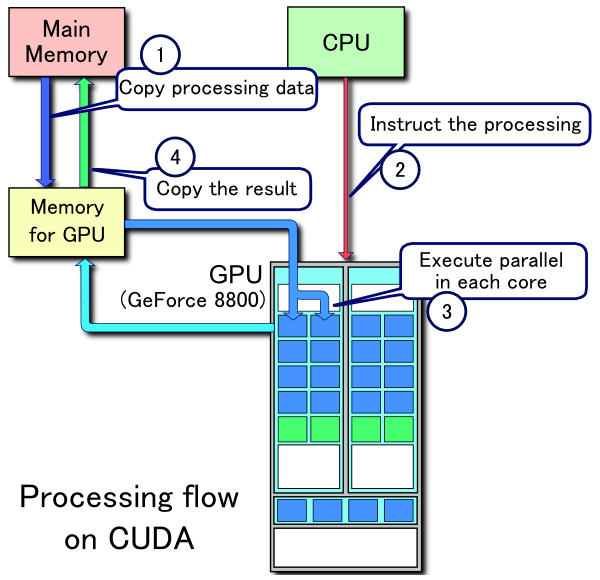
GPU (Graphics Processing Unit) is the hardware commonly referred to as a graphics card. AMD also produces graphics cards, but in the machine learning field, frameworks such as TensorFlow and PyTorch currently rely on CUDA-based acceleration, so here the term specifically refers to Nvidia’s parallel accelerators that support CUDA. Unlike many simple hardware peripherals, a GPU is essentially an external, specialized independent processing device. Typically, we need to transfer data from system memory to video memory, invoke the card’s concurrent computation scripts (compiled from .cu source), and then copy the results back from the GPU before proceeding to the next step. Therefore, when virtualizing compute resources in cloud environments, CPU capacity can be easily divided, whereas GPU capacity is much harder to split.
A typical GPU workflow is as follows[1]:
Nvidia Driver #
Nvidia Driver is the driver installed on the host machine. Once installed, following the Unix principle that everything is a file, you can find some files in the /dev directory as follows. Files such as nvidiactl and nvidia-uvm are shared, while /dev/nvidia0 is the first card; if there are multiple cards, you will see /dev/nvidia1 and so on. The so-called container-based virtualization on the market usually mounts the corresponding devices into the container. In particular, qgpu and similar solutions make more in-depth modifications: they construct virtual device files inside virtual containers and forward requests. Regardless of the implementation, container-based cloud architectures typically require you to modify some kernel code, install it on the host, and register device files through hardware interfaces.
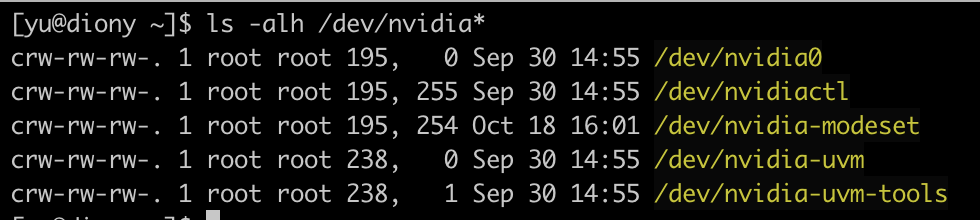
As shown in the figure above, we need to locate this device file in order to communicate with it.
The official index address for driver downloads is: https://www.nvidia.com/en-us/drivers/unix/
CUDA #
CUDA (short for Compute Unified Device Architecture) is a parallel computing platform framework provided by Nvidia. Its compiler can compile .cu files into device code by calling the runtime API, and compile C/C++/... files by calling the driver API to interact with the device. Since these compiled outputs all need to link against relevant dynamic libraries (usually some libnvidia*.so and /usr/local/cuda/*/libcu*.so library files under /usr/libX), we have packaged these essential files directly into the container.
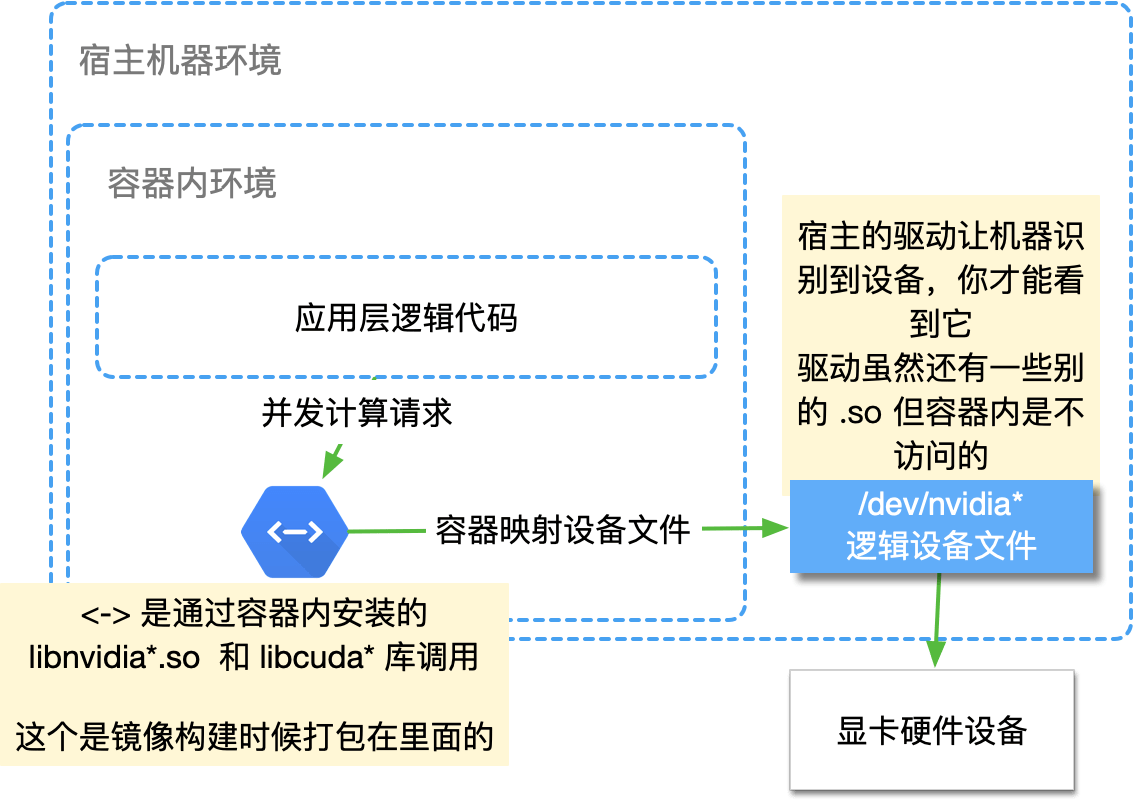
Therefore, what the program actually calls is the .so library installed inside the container, while the device files used to interact with the hardware are generated after the host driver is installed and the host recognizes the hardware.
Application-layer code invokes the CUDA API inside the container and communicates with those device files. The device-file protocol depends on the host driver.
Compute capability #
Compute capability is a concept that comes into play when CUDA interacts with the driver. Because different GPU architectures are implemented differently, compatibility is usually achieved by compiling multiple copies of the code at build time. If this does not match, you typically need to recompile for the specific target; the error message usually looks something like "toolchain xxx".
A few observations on compatibility #
For applications running inside the container, we don't care about the host environment's CUDA, and we don't call the host's
libcu*libraries at runtime. It only acts as a hint indicating "which version this driver recommends or is compatible with"; the actual behavior should be verified by testing inside the container.Consumer GPUs (1080Ti, 2080S, 3090, etc.) have very strict compatibility. If the CUDA major version differs, the program will definitely fail to start. For minor versions, the driver version should be slightly greater than or equal to the version corresponding to the CUDA version, but not much newer. Refer to the official Compute Capability table and the Release Notes for the mapping.
- In particular, the Release Notes' Table 3. CUDA Toolkit and Corresponding Driver Versions lists the minimum driver version required for each CUDA version. For consumer GPUs, the host driver must be configured strictly according to this table for the corresponding CUDA version.
Data-center cards such as the V100 and A100 are a bit more forgiving, but the exact behavior still needs to be verified by actual testing. In addition, we must always check compute capability; if machine code for the corresponding version was not compiled, you will encounter error messages similar to
RuntimeError: CUDA error: no kernel image is available for execution on the device. In that case, the corresponding CUDA code needs to be recompiled. Usually, for PyTorch and similar frameworks, we need to set the environment variableTORCH_CUDA_ARCH_LISTto something like7.0;7.5;8.6and then recompile the binary. For an already-compiled PyTorch, you can try running the Python scriptprint(torch.cuda.get_arch_list())to list and confirm the supported targets.
Basic Functionality Test #
Inside the container, run code similar to the following:
echo "Torch Version: $(python -c 'import torch; print(torch.__version__)'), Is CUDA Available: $(python -c 'import torch; print(torch.cuda.is_available())')"The expected output is as follows:
Torch Version: 1.8.1+cu101, Is CUDA Available: TrueUsually, +cu101 indicates that it is built for CUDA 10.1; is available is expected to be True. If it is False, it means CUDA is not working at least here.
Further Related Reading #
- CUDA Toolkit: https://developer.nvidia.com/cuda-toolkit
Comments
No comments yet — be the first to write one.